
Agent-assisted workspaces
BRAINWAVR
Structured projects, versioned artifacts, AI actions, and domain workspaces.
Manage projects, track every artifact version, run automated workflows, and let AI agents handle the repetitive work — all from one workspace. 52 MCP integrations give agents structured access to the same surfaces you use.
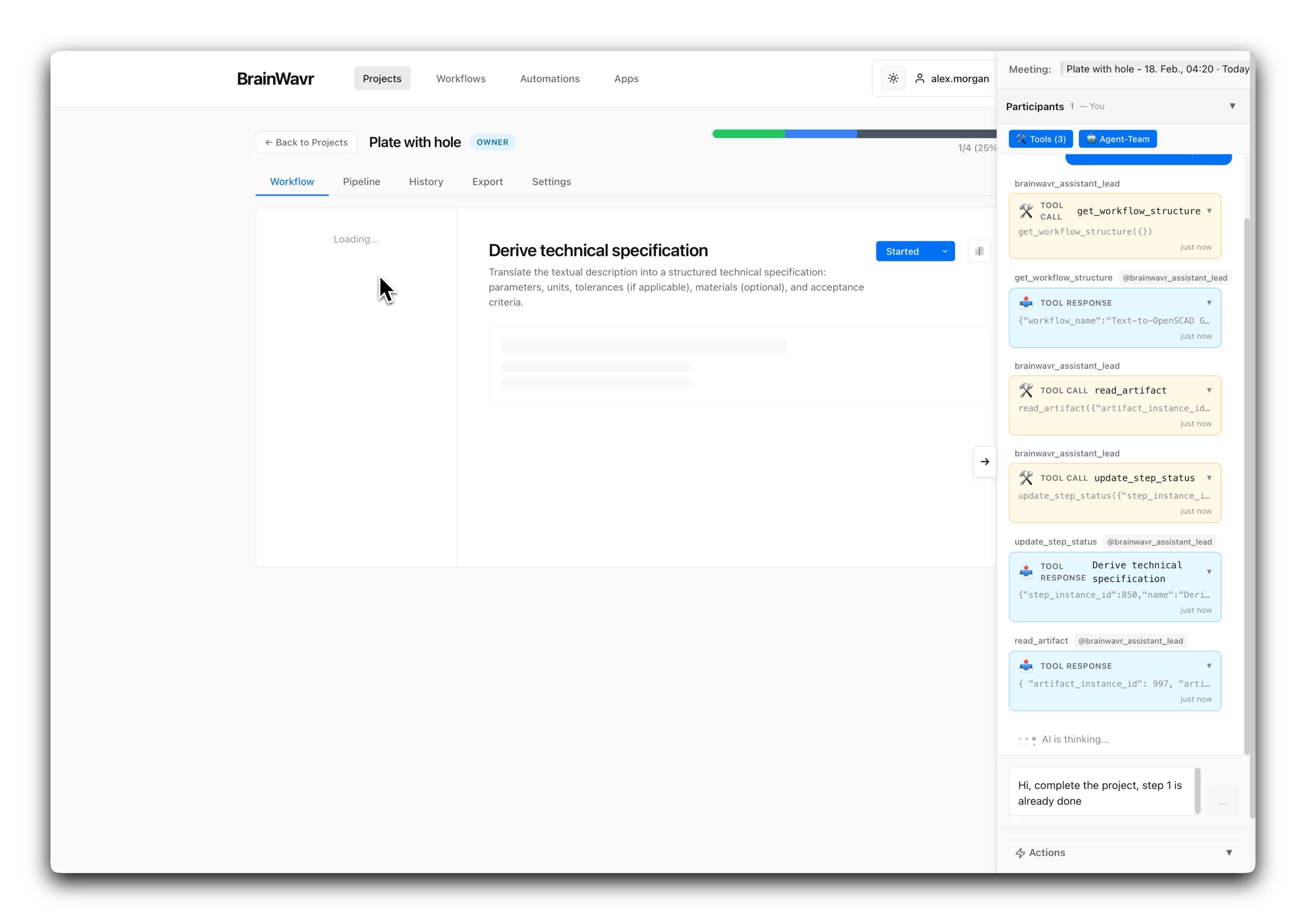
Agent-assisted workspace
AI agents execute MCP tool calls directly inside the project workspace — navigating workflows, reading artifacts, and updating step status through documented endpoints.
Workspace backbone
The project workspace combines workflow navigation, progress, collaborators, export, history, chat, and actions in one authenticated view.
Versioned outputs
Artifacts, readiness checks, templates, export execution, and version history give every project a structured output pipeline.
Agent tooling
52 MCP integrations give AI agents structured access to projects, workflows, artifacts, exports, auth, and system status.
Product thesis
Structured work, from step execution to output packaging
BrainWavr keeps the entire project lifecycle in one workspace — workflow steps, versioned artifacts, AI actions, and domain views — instead of scattering them across disconnected tools.
Projects become navigable workflow workspaces instead of flat task boards. Each step has its artifacts, collaborators, and progress state in context. Version history and export readiness are built into the artifact model, not bolted on as afterthoughts.
AI actions and pipelines have a visible operational surface. When work should be automated or delegated, the same project data flows into actions, schedules, batch runs, and agent-driven execution through documented MCP endpoints.
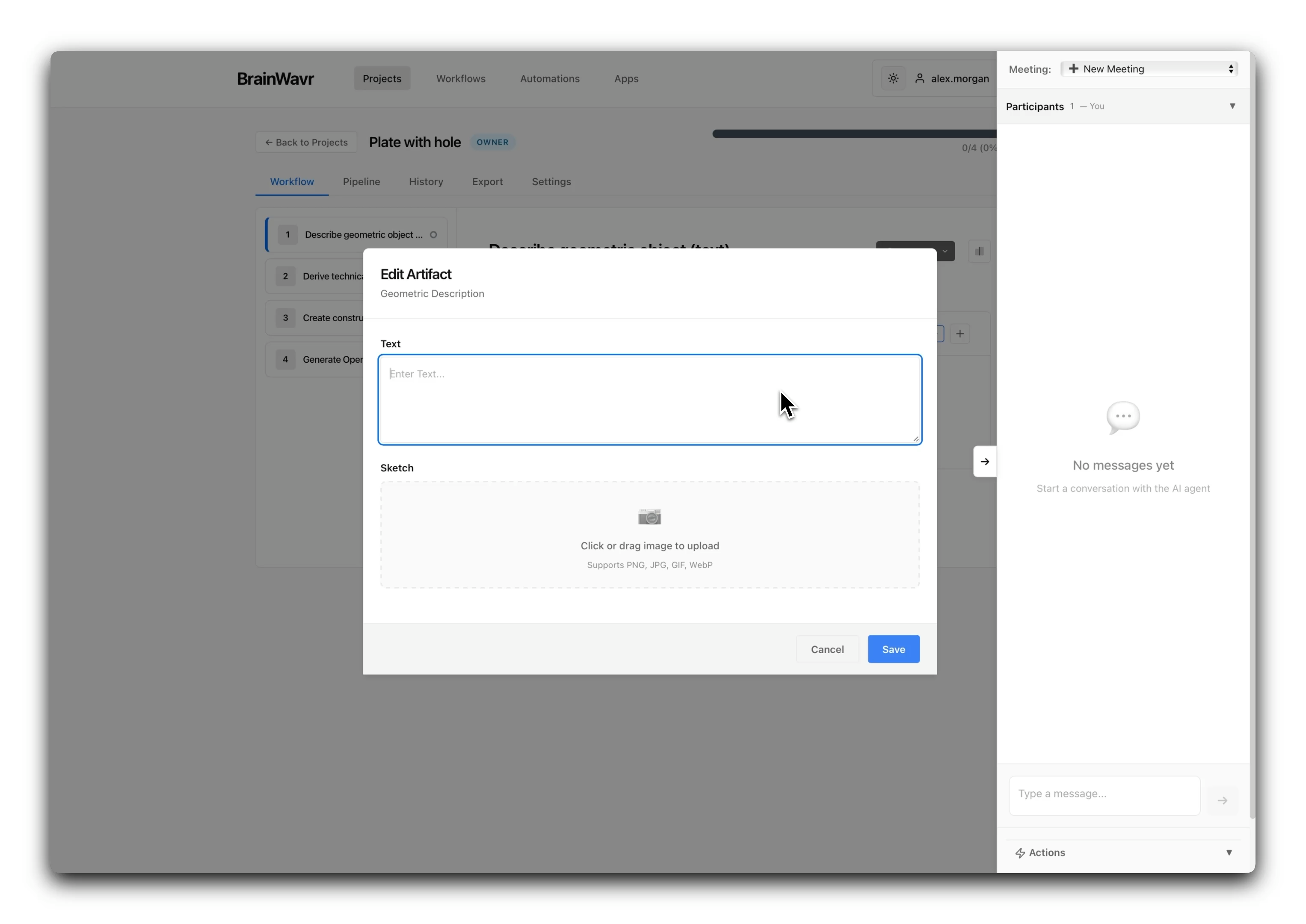
Project workspace
Split-panel workflow navigation with step progress, artifact editing, and collaborator management — all inside one authenticated surface.
Workflow walkthrough
From project open to agent-driven execution
Five stages show how a project workspace moves from manual navigation through versioning, automation, and domain-specific views.
01
Open the project workspace
Start from the project workspace and move through the workflow tree, progress state, collaborators, and the main workspace tabs.
02
Advance steps and maintain context
Keep workflow progress, selected steps, collaborators, and chat context tied to the project rather than spread across disconnected screens.
03
Review versions and prepare outputs
Use version history, export readiness checks, and templates to prepare deliverables with traceable artifact state.
04
Run actions and automations
Move into actions, pipelines, schedules, batches, and run monitoring when work should be automated or delegated.
05
Switch into domain or agent surfaces
Open specialized views such as the 3D wellbore field and extend the same project data through MCP tools.
Product gallery
The workspace in action
Project workspaces, workflow editing, agent-assisted execution, and domain-specific analysis views.
Project workspace
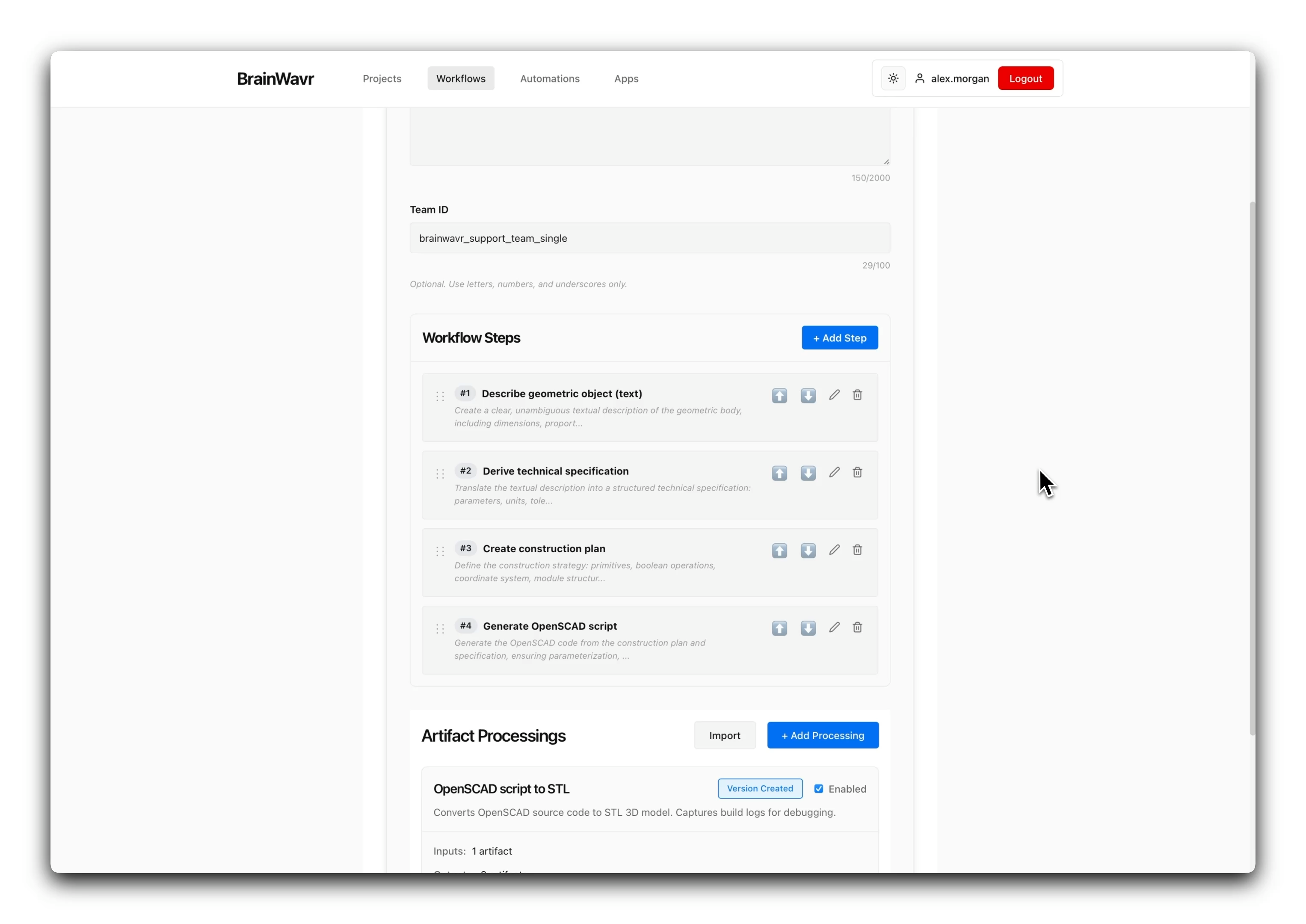
Workflow editor
Agent-assisted execution
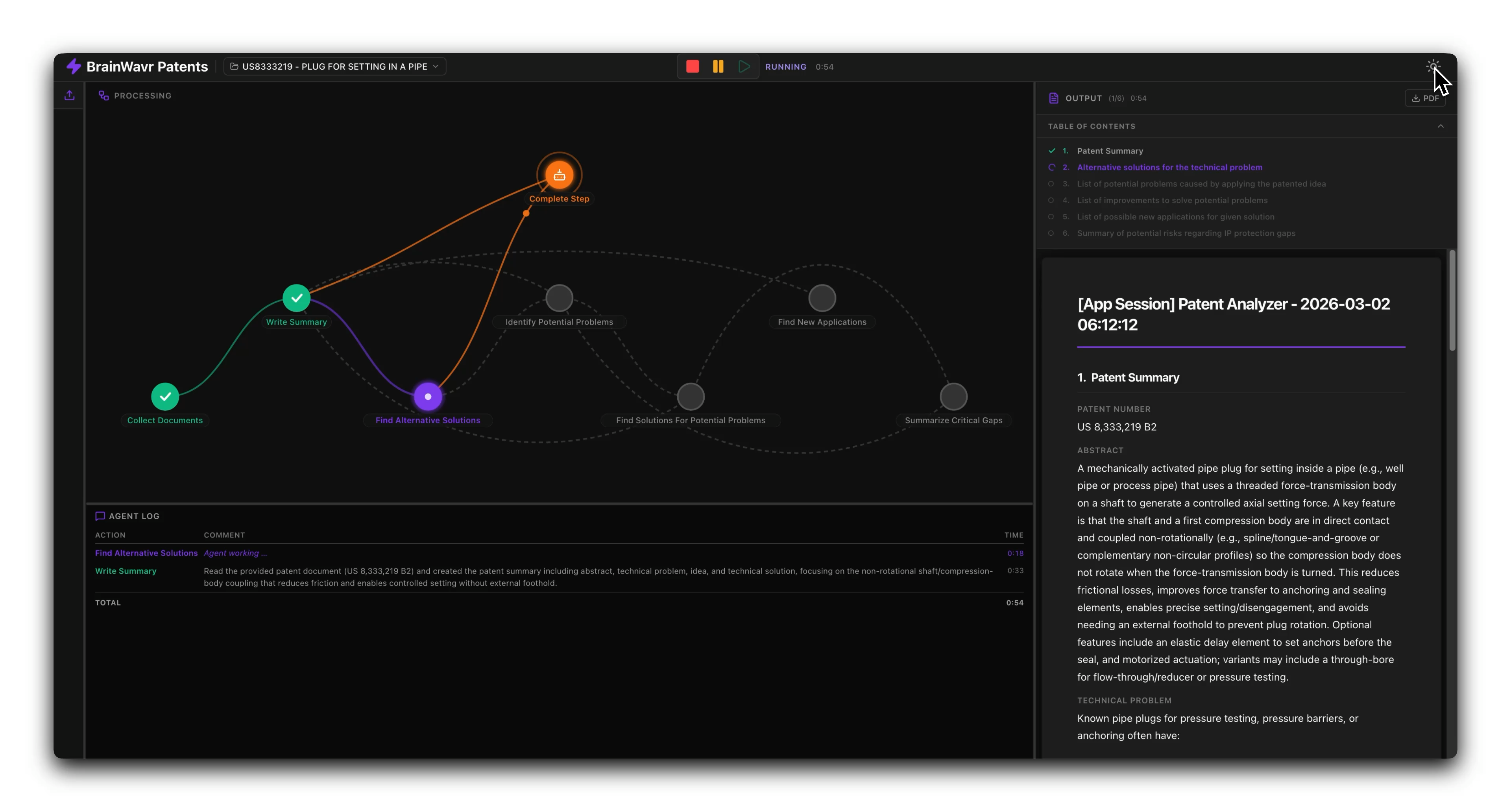
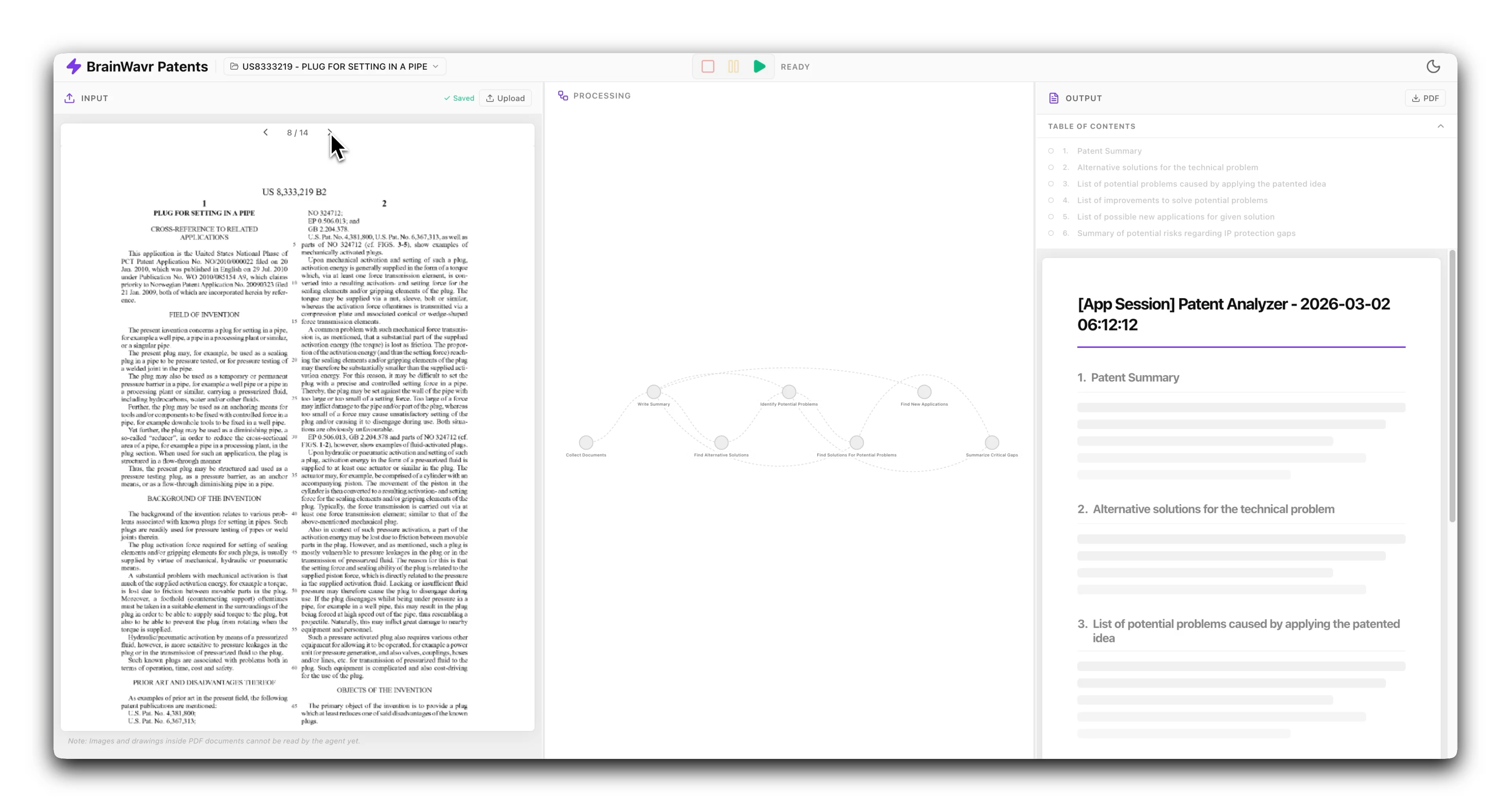
Domain workspace — patent analysis
Feature deep dive
Workspace, versioning, automation, and domain views
Four capabilities that define BrainWavr — from structured project management to specialized domain analysis.
Project workspace
The project detail surface combines a split-panel workflow tree, per-step artifact editing, collaborator management, and workspace tabs for history, export, chat, and pipeline execution.
- Split-panel workflow navigation with step progress and artifact editing.
- Collaborator management with role assignment and project-level permissions.
- Workspace tabs: Workflow, Pipeline, History, Export, Settings, Chat.
Artifact history and export
Every artifact is versioned. Export readiness analysis, template management, and review flows give teams a traceable path from working draft to deliverable.
- Artifact version tracking with change history and review status.
- Export readiness checks and template-based output formatting.
- Review flows for team handoff and approval before final export.
AI actions and automations
Actions, pipelines, schedules, batch runs, and execution monitoring — all connected to the project context and accessible to AI agents.
- Action editor with step configuration and artifact-linked triggers.
- Pipeline builder for multi-step automated workflows.
- Schedule and batch run management with execution monitoring.
Domain workspaces
BrainWavr is not limited to generic workflow boards. The platform supports domain-specific views, including a 3D wellbore field workspace for oil and gas applications and a patent analysis workspace.
- Interactive 3D wellbore field visualization with real geological data.
- Patent analysis workspace with document processing and summary output.
- Domain views integrate with the core project and artifact model.
Architecture & agent tooling
Four-layer stack with 52 MCP endpoints
BrainWavr runs a documented multi-service architecture: Next.js (View), FastAPI (Controller), Django (Model), and FastMCP (MCP Server). The MCP layer exposes controller endpoints as tools for AI agents.
View — Next.js
Project workspaces, workflow navigation, chat, and export UI.
Controller — FastAPI
Orchestration layer routing requests between UI, model service, and MCP.
Model — Django
Data models for projects, workflows, artifacts, and user management.
MCP Server — FastMCP
52 controller endpoints exposed as tools for AI agent access.
- MCP tools span six categories: projects, workflows, artifacts, exports, authentication, and system status — each mapping directly to controller endpoints.
- AI agents can navigate workflow structure, read and update artifacts, advance step status, and trigger pipeline execution through the same endpoints the UI uses.
- The architecture runs a multi-service stack — this is a concrete integration map, not an aspirational diagram.
What is MCP?
Model Context Protocol (MCP) is a standard for exposing application capabilities as tools that AI agents can discover and invoke. BrainWavr's FastMCP server maps 52 controller endpoints as tools — giving agents structured access to the same project, workflow, and export surfaces the UI exposes.
Product overview
Capabilities, roadmap, and resources
What BrainWavr does today, what's coming next, and where to explore.
Core capabilities
- Project workspaces with workflow, collaborator, history, export, chat, and action tabs.
- Export templates, readiness analysis, artifact versions, and review flows.
- Actions, pipelines, schedules, batch runs, and execution monitoring.
- 3D wellbore field workspace with interactive domain visualization.
- 52 MCP integrations across projects, workflows, artifacts, exports, auth, and status.
What's next
- Refinement of domain-specific views beyond the wellbore workspace.
- Expanded MCP tool coverage for advanced agent-driven workflows.
- Collaborative real-time editing within shared project workspaces.
- Advanced export templates and compliance-aware output formatting.
Explore further
- Open a workspace and navigate the project view.
- Review the automation layer — actions, pipelines, and batch execution.
- Explore the 3D wellbore field workspace and domain-specific views.
- Browse the MCP tool categories and integration endpoints.
Powered by ScaiCo
Multi-agent AI infrastructure for workflow execution
BrainWavr runs ScaiCo as its multi-agent backbone. Agent teams, workflow-linked actions, and pipeline execution all route through the ScaiCo orchestration layer.
ScaiCo powers agent execution
ScaiCo orchestrates agent teams for workflow steps, patent analysis, and domain-specific processing — coordinating multi-step execution with structured tool access.
- Agent teams launch from the project workspace — each coordinated by ScaiCo with tool-call tracking, step-status updates, and workflow-aware context management.
- ScaiCo routes agent actions through the same MCP endpoints available to external tool consumers — ensuring agent behavior and UI behavior share the same capabilities.
- Pipeline execution, batch runs, and schedule management are all orchestrated through ScaiCo, providing unified monitoring and execution tracking across automated workflows.
What is ScaiCo?
ScaiCo is Swaibian's multi-agent AI orchestration platform. In BrainWavr, it powers agent-team execution — coordinating specialized agents for workflow steps, artifact processing, domain analysis, and pipeline automation within the project workspace.
Next step
Open a workspace and explore
Project workspaces, workflow navigation, artifact versioning, automation, and agent-assisted execution — ready to use, with 52 AI integrations for agent-driven workflows.